 By
By A few months ago I started a new project for a client, based on SharePoint 2019. After a few weeks working on the client side with SharePoint framework and React I created a SharePoint Farm solution project to be able to create and deploy a WCF service.
Everything worked fine, I was able to create the WCF project and to deploy it to SharePoint 2019. After that I started to develop the web service and after a while I tried to deploy it once again. This time it didn’t worked anymore and the only error that I got was: “Error occurred in deployment step ‘Recycle IIS Application Pool'”: Invalid namespace”. I was not able to find more details about this error.
Here you can see the error occurring on a test project that I’ve created to check if I get the same error:

Funny thing was that once I uninstall the solution and remove it from Central Administration, I was able to deploy the Visual Studio 2017 solution again.
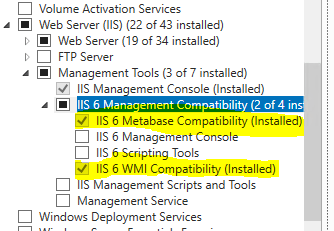
I started searching on the internet and after a few minutes I found the solution: I had to install the IIS 6 Management Compatibility option part of the Web Server (IIS) role. You have to go to Server Manager -> Add Roles and Features -> Role-based or feature-based installation and the from Web server (IIS) -> Management Tools select the following 2 options:
- IIS 6 Metabase Compatibility
- IIS 6 WMI Compatibility
After that I was able to deploy my Farm solution without any issues and work again on the old school server side project.

 octavian sfetcu